

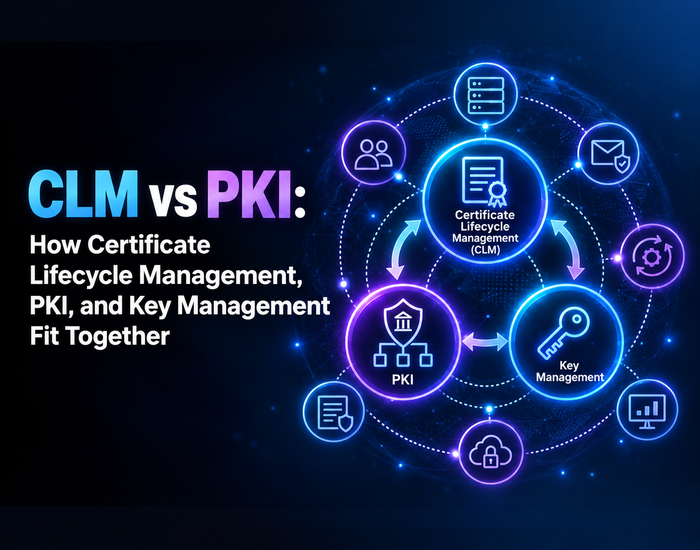
CLM vs PKI: How Certificate Lifecycle Management, PKI, and Key Management Fit Together
CLM vs. PKI—What Is the Real Difference?
CLM is not a PKI or vice versa. The trust system that generates and validates digital certificates is called Public Key Infrastructure (PKI). The mechanism for maintaining those certificates every day is called Certificate Lifecycle Management (CLM). The private keys are secured by Enterprise Key Management Systems (KMS). Together, these safeguard your websites, apps, and devices from being unsafe and untrustworthy.
This guide will familiarize you with the role of each of these: PKI, CLM, and KMS. You’ll also discover how the integration of CLM and key management can prevent your enterprise from experiencing outages and security holes.
What Is Public Key Infrastructure (PKI)?
Public Key Infrastructure (PKI) is a collection of rules, software, and hardware. It creates, issues, and verifies digital certificates and keys. In PKI there are two types of keys: public keys and private keys. The public key is used to encrypt information. It can only be unlocked by the matching private key.
How PKI Works
There are common elements to all PKI configurations. A request is made for a certificate either by an apparatus or an individual. These are then checked by a certificate authority (CA). The CA then issues a certificate that correlates the identity with a public key. Finally, other systems assume the trust of that certificate, as they trust the CA.
Need the nitty-gritty details? Learn what is Public Key Infrastructure (PKI), how it works, its components and benefits.
Core Components of PKI
- The Certificate Authority (CA) is responsible for creating and signing certificates.
- Registration Authority (RA): validates identity prior to issuing
- Digital certificates: “ID cards” created by PKI
- A public key and a private key: the two keys that are used to encrypt/decrypt data
- The certificate repository is a place where certificates are stored and shared.
PKI issues several kinds of certificates for different jobs across your enterprise. See the full breakdown in digital certificate management: the certificate types your enterprise needs to track.
What is Certificate Lifecycle Management (CLM)?
Certificate Lifecycle Management (CLM) is the management of a certificate from creation to retirement. The certificate is created by PKI. CLM makes sure the certificate is valid, installed, and secure for as long as your business needs it. For a closer look at each stage of this process, see certificate lifecycle management: importance, stages, and best practices.
Why CLM Matters?
Public certificates are not valid for a long period of time. The CA/Browser Forum has already cut the maximum life of a public certificate to 200 days. That number drops to 100 days in 2027 and 47 days in 2029. Without CLM, teams are quick to forget renewal dates. One failure to renew can make a website, app, or service unavailable. Read more on the common mistakes that cause this and how to prevent them.
CLM vs PKI: What Is the Difference?
Here’s a simple way to tell the difference between CLM and PKI:
- PKI is the system of trust. It provides a procedure for issuing and validating certificates.
- The certificates created by the PKI are handled by CLM. It documents the issuance, renewal, and removal.
- The question “Is this certificate real?” is answered by PKI.
- The question “Does this certificate remain valid, installed, and secure today?” is answered by CLM.
To sum up, PKI is the groundwork. The day-to-day activity is CLM.
PKI vs CLM vs Key Management: Three Different Jobs
A third layer is added by Enterprise Key Management Systems (KMS). A KMS protects, stores, and rotates all certificates’ private keys. Without strong key management, even the best managed CLM program is susceptible.
Think of it this way:
- The certificate and key pair are issued by PKI.
- KMS safeguards and securely holds the private key.
- CLM monitors the status of the certificate and renews it as necessary.
When it comes to PKI vs. CLM vs. key management, none of the three can replace the others. All of them are associated with a specific part of the same trust chain.
How CLM and Key Management Integration Helps Your Enterprise
If they are used as standalone products, there are some issues with PKI, CLM, and key management. A certificate can be valid even if its private key sits in an uncontrolled area. That’s why integration of CLM and Key Management (KM) is crucial in enterprise security.
These pieces are brought together for you by AppleShine Tech. We have a key management solution to protect your private keys, to control access to private keys, and to seamlessly integrate with your certificate lifecycle management processes. Your team now has a single view of certificates and the keys that enable them.
There are some reasons why integration works:
- Shorter time between certificate status and key security
- Quicker reaction to the exposure or compromise of a key.
- Unmistakably audited certificates and keys.
- Less likelihood of outages due to expired certificates or lost keys.
Conclusion
The three systems (PKI, CLM, and key management) are not mutually exclusive. PKI builds trust. CLM maintains certificates and renews them. Key management safeguards the private keys that back them up. They jointly solve the CLM vs PKI dilemma by illustrating how each component contributes to the other.
This collaboration is even more important each year as the length of certificates continues to grow shorter. The first thing is to know the location of each piece in your business. Next, search for the tools that bring together PKI, CLM, and key management, rather than separating them.
It’s time to connect certificates and keys! Explore our key management service.
FAQs About CLM vs PKI
What is the main difference between CLM and PKI?
PKI creates and verifies digital certificates. CLM manages those certificates after PKI issues them, including renewal and removal.
Does my enterprise need both PKI and CLM?
Yes. PKI without CLM leads to forgotten, expired certificates. CLM without PKI has nothing to manage.
What does Enterprise Key Management do differently from CLM?
Key management protects the private keys behind each certificate. CLM tracks and renews the certificates themselves.
Why should CLM and key management work together?
CLM and key management integration close security gaps. It links certificate status directly to key protection and access control.
What happens if I only use PKI without CLM?
Certificates can expire unnoticed. This can cause outages, security warnings, and loss of customer trust.